La marketplace des expats
Vendez avant de partir · Achetez en arrivant


Dernières annonces publiées
Vendeurs qui partent.
Acheteurs qui arrivent.
ToMoveOut connecte les expats dans les corridors les plus actifs au monde.
Tout pour réussir votre déménagement
ToMoveOut réunit en un seul endroit tout ce dont vous avez besoin avant, pendant et après votre déménagement international.
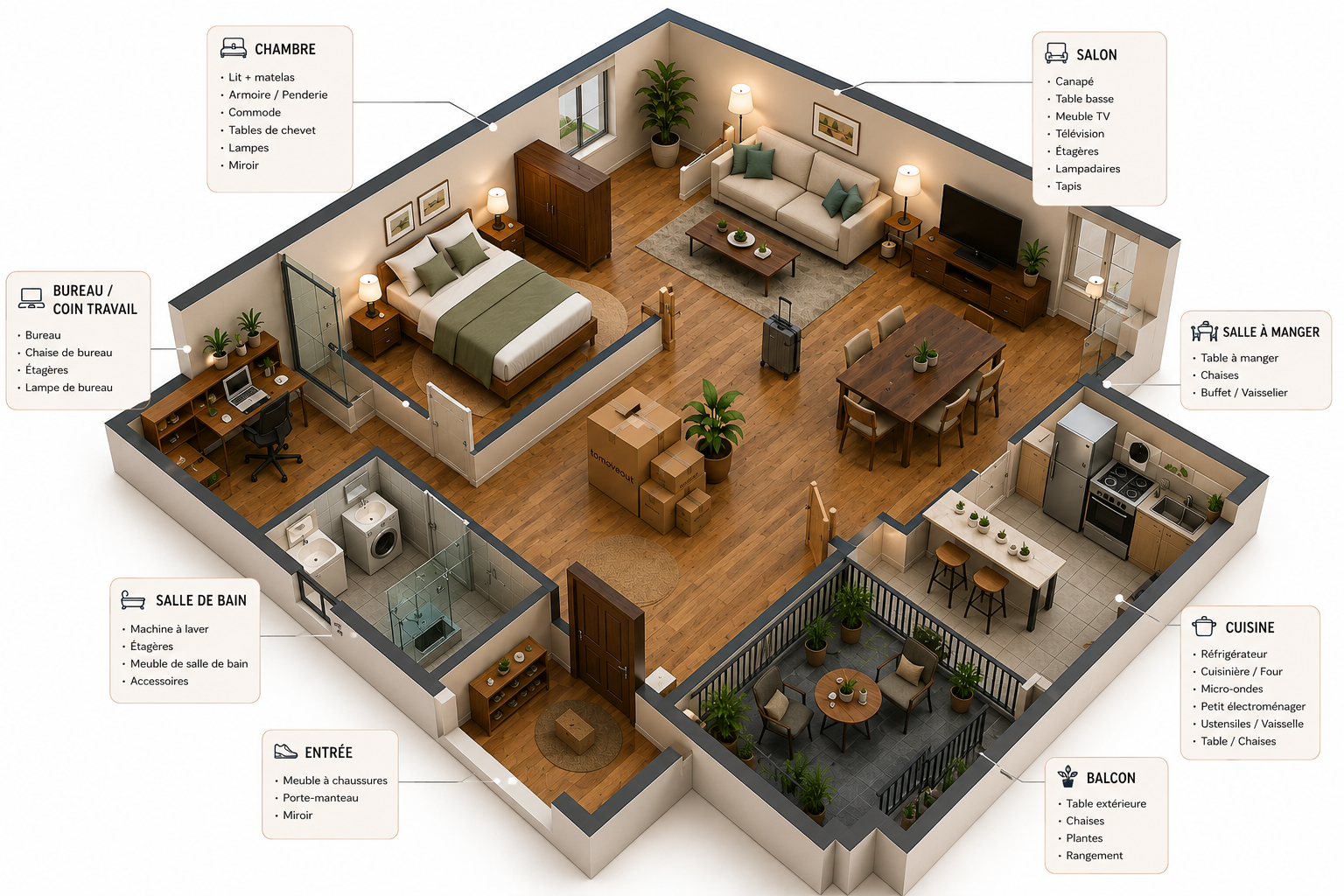
Le concept par pièce de vie
Survole chaque pièce pour voir les objets disponibles. Meubles, électro, déco — achetez uniquement ce dont vous avez besoin.
Vendre ou acheter entre expats,
en 3 étapes simples
Aucune commission, aucun intermédiaire — juste des expats qui s'entraident.
Profitez d'une meilleure
expérience grâce à la
web app ToMoveOut
Toutes vos annonces, la communauté et votre Parcours Expat au même endroit — avec les dernières informations et des fonctions exclusives pour téléphones et tablettes.
Ce qu'ils disent de ToMoveOut
Des expats qui ont vendu, acheté ou déménagé avec ToMoveOut.
"J'ai vendu tout mon appartement parisien en 3 semaines avant de partir au Canada. L'IA a estimé chaque objet au juste prix et j'ai trouvé un acheteur unique pour tout via le Move Kit."
"Arrivant à Bruxelles, j'ai équipé tout mon appartement via ToMoveOut pour moins de 800 €. Le matching m'a mis en contact avec un Français qui repartait — timing parfait !"
"Le Parcours Expat m'a sauvé la mise pour mon PVT en Australie. Checklist gamifiée, rappels, tout était là. J'aurais raté 3 démarches sans ça !"
Frequently asked question
Yes, on the Tomoveout site you can place an ad free of charge, and you can also modify it, add photos or change its content. Posting an ad is 100% free.
It couldn't be simpler: the Tomoveout website allows you to place an ad intuitively, depending on the type of ad you're looking for. We are aware that the exchange of goods between expatriates must be accessible to all. To place an ad on our site, simply click * on « I’m moving ». To do this, simply click on the following link or click on the button at the top right of the site
* You must be logged in with a user account to place an ad.
When you are logged in to your personal space (profile), you can select the ad you wish to modify from the profile or dasboard menu by clicking on the ... to the right of the moving out ad or item and then clicking on « edit ads » or « edit item » in the sub-menu. You can then make the necessary changes.
Tomoveout incorporates an instant messaging system that enables you to contact and chat with expatriates quickly in order to exchange ideas and ask the right questions about moving out ads and items for sale or give. This instant messaging system can be found in the expatriate's user profile in the « Message » tab, which will display messages from buyers wishing to ask questions about the item or make an appointment to finalise a transaction.
You can change your password from the dashboard of your user profile by clicking on « Settings » and then « Change password » at the left of the page. You can enter your current password and enter a new one that complies with the robustness security criteria (at least 8 characters, an uppercase letter, a special character, a lowercase letter and a number).
Frequently asked question

How do I place an ad ?

It couldn't be simpler: the Tomoveout website allows you to
place an ad intuitively, depending on the type of ad you're
looking for. We are aware that the exchange of goods between
expatriates must be accessible to all. To place an ad on our
site, simply click * on « I’m moving ». To do this, simply
click on the following link or click on the button at the top
right of the site
* You must be logged in with a user account
to place an ad.

Is posting an ad free ?
Yes, on the Tomoveout site you can place an ad free of charge, and you can also modify it, add photos or change its content. Posting an ad is 100% free

How can I modify my ads ?
When you are logged in, you can select the ad you wish to modify from the profile or dasboard menu by clicking on the ... to the right of the moving out ad or item and then clicking on « edit ads » or « edit item » in the sub-menu. You can then make the necessary changes.
Our Partners
Subscribe to our newsletter
Receive great deals and the latest news from France's leading moving website, plus promo codes and more...


